
Broadcasting larger group sessions can be challenging. In addition to the computing and networking resources needed to send audio streams among the musicians in the group, video streams must also be sent and processed.
Let's say you have 6 musicians in your group, and that you are going to have a friend of your group act as your session broadcaster to keep an eye on mix levels and handle camera cuts during the broadcast. Your broadcaster will turn off their webcam (no one wants to watch your broadcaster during your performance), but each musician in the session will still send 6 video streams (to 5 musicians + 1 broadcaster) and receive 5 videos streams. This represents a ton of additional bandwidth and processing power to handle, and it can easily result in quality issues like jitter, audio artifacts, and so on.
To make larger sessions much easier to broadcast, JamKazam built a feature to limit video streams to only what is essential for the broadcast. Here is is how to use it.
Each musician should look at the bottom of their JamKazam video window in their browser to see the video feature icons there. Click the Layout icon, and then click to select the Only You option (see screenshot below).
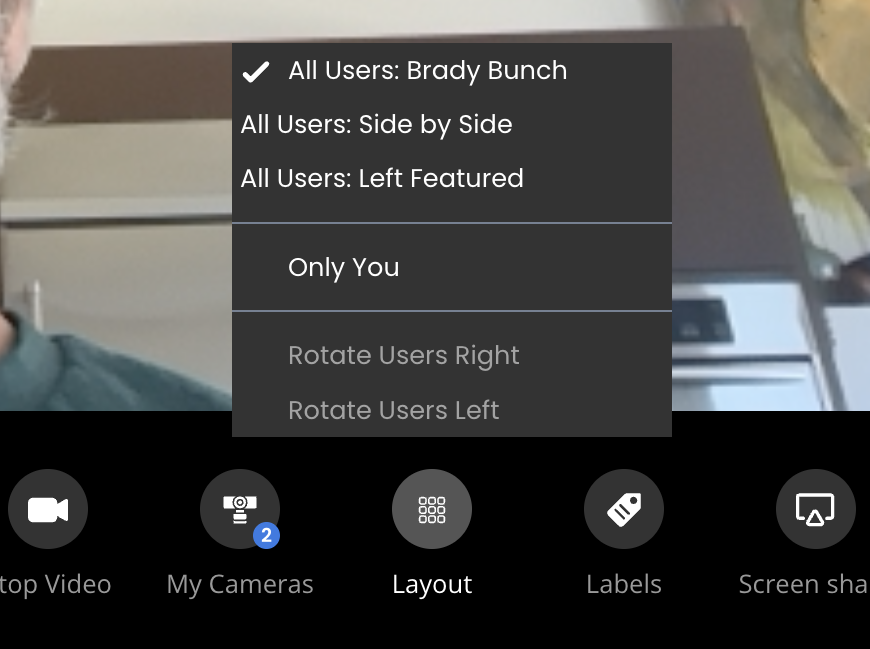
When you select this option, you'll see the video window update, so that you now only see video of yourself from your own webcam. You no longer see video from others in the session. Behind the scenes, JamKazam updates things so that your computer no longer receives video from anyone else, and so that your computer sends the video stream of you only to the broadcaster. So where previously you would have been sending 6 video streams and receiving 5 video streams, you now send just 1 video stream and receive 0 video streams. You're almost back to the point of an audio-only session in terms of computer power and bandwidth, yet you're live broadcasting a 6-person session. Awesome!
(You can always click Layout and select one of the All Users options, and video streaming will resume.)